
Life Coach Discovery Call Booking Page: What to Include and Test
A life coach discovery call booking page should explain who the call is for, what will happen, how long it takes and what happens after someone chooses a time. It should also make booking work reliably on a phone. A calendar alone does not answer those questions.
This guide focuses on the page and booking journey, rather than choosing an entire website platform. If you are still deciding where to build, start with our website-builder comparison for life coaches. Here, the aim is to help a suitable visitor decide whether to book and understand the next step.
Decide whether visitors are booking a call or requesting one
These are different promises. An appointment scheduler can confirm an available time immediately. An enquiry form may only send a request for you to review. Your button, confirmation screen and emails should describe the same process.
For an instant booking, a button such as “Choose a Discovery Call Time” is clear. For a request form, use “Request a Discovery Call” and explain when you normally reply, using a timeframe you can actually meet. Do not say a call is confirmed if it still requires your approval.
Explain the call before showing the calendar
Put a short explanation above the booking tool. Include the kind of person you work with, the call’s purpose, its actual duration and whether it is free or paid. Explain whether the conversation is a fit assessment, an introduction to coaching or a paid consultation. Those terms should reflect your real service.
Example copy you can adapt
“Considering coaching for a career transition? This introductory call is a chance to discuss what you are looking for, ask questions about my approach and decide whether a longer conversation makes sense. Choose an available time below. You will receive the meeting details after your booking is confirmed.”
This is an illustrative example, not a claim about any particular coach. Add your real duration, price and meeting format. Avoid promising a breakthrough, a diagnosis or a guaranteed outcome from an introductory call.
Give visitors enough context to assess fit
A concise sentence about your coaching focus is usually more useful here than repeating your entire About page. Link to your approach or services if someone needs more detail. If you have requirements or do not serve certain needs, explain them respectfully before a visitor spends time booking.
Use a short form that helps you prepare
Ask only for information needed to arrange or prepare for the call. A name, email address and a short optional question about what the visitor wants to discuss may be enough. A phone number should not be required simply because the scheduler offers a phone field.
- Make required fields clear.
- Explain why you ask for information that may not seem necessary.
- Keep open-ended answers brief and optional where possible.
- Link to your published privacy information near the form.
- Do not ask visitors to put passwords, payment-card details or detailed sensitive personal histories into a general booking form.
If a separate intake questionnaire is genuinely needed, explain when and how you send it. Moving a long questionnaire away from the first booking step can make the initial task easier, but the choice should follow your actual coaching process.
Choose an embedded calendar or a booking link
An embedded scheduler keeps the visitor on your website. A link to a hosted booking page can be simpler to maintain and may work better if an embed is too tall, slow or awkward on mobile. Neither option is automatically better.
When an embed makes sense
Use it when the calendar fits the page, remains readable on a small screen and can be used without scrolling sideways. Check that the page explanation remains visible before the embed begins. A large scheduler should not hide the purpose of the call.
When a hosted link makes sense
Use a clearly labelled button when the hosted booking page offers the better experience. Explain that it opens the booking calendar. If it opens in a new tab, make that behaviour clear where appropriate. Keep a working contact alternative in case the scheduler fails to load.
For example: “Calendar not loading? Send a booking enquiry through the contact form.” Only offer this route if the form and email delivery have been tested.
Make time zones and meeting details unambiguous
International visitors need to know which time zone is displayed. Check the scheduler’s actual behaviour instead of assuming it converts times correctly. Test from another time zone where the tool supports it, and compare the selected time with the confirmation email and calendar event.
The confirmation should tell the visitor the date, time, time zone and meeting method. If you send a video link later, say so and explain when. If the call is by telephone, explain who calls whom. Use the scheduler’s genuine cancellation and rescheduling links rather than promising options that have not been configured.
Test the entire booking journey, not just the button
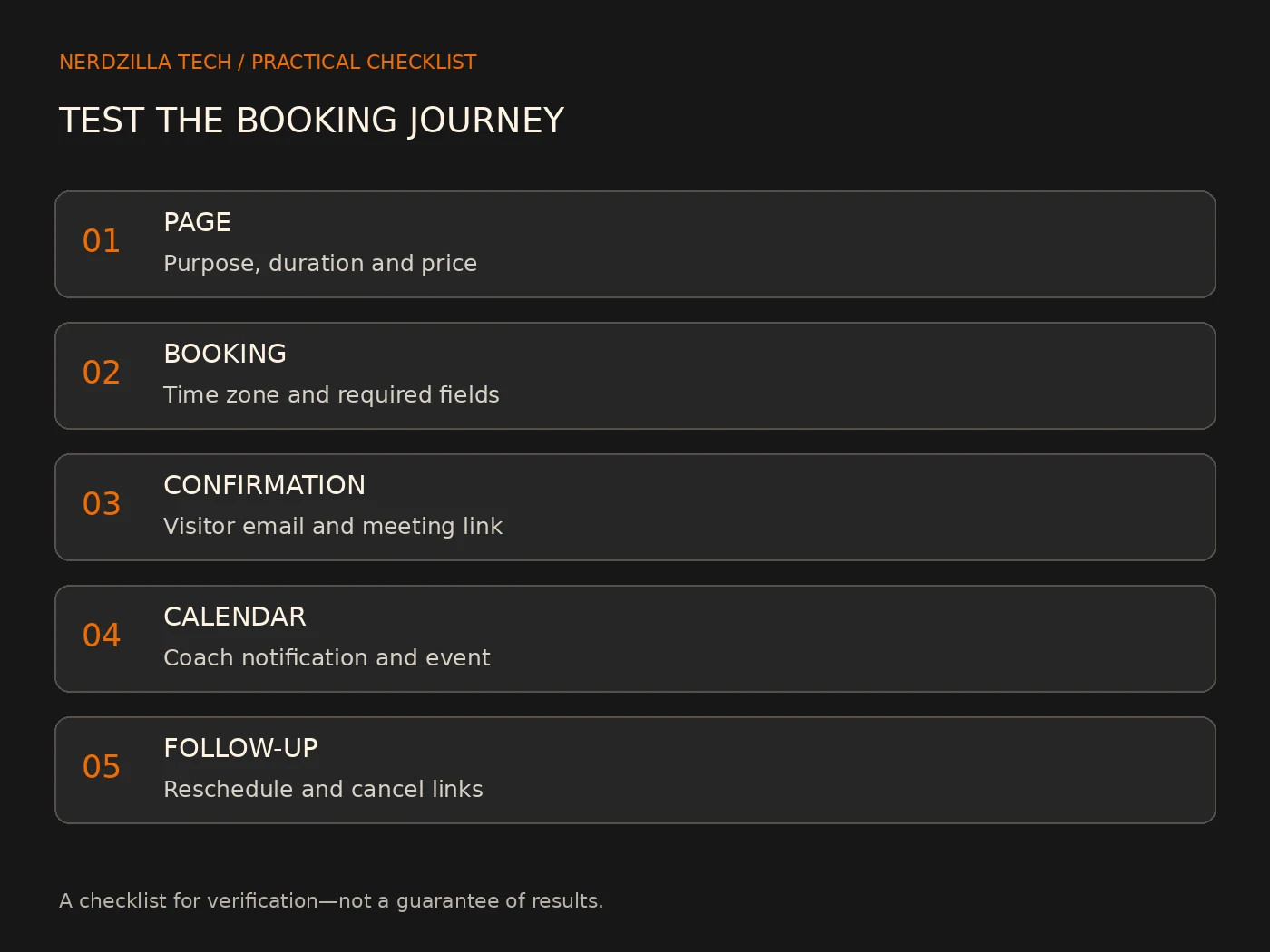
A button that opens a calendar is only the first part of the journey. Run a test booking using an address you can check. If your tool offers a test mode, use it where appropriate; otherwise choose a clearly identified test appointment and cancel it afterward.
- Open the published page on desktop and mobile.
- Read the explanation and check the button describes the action accurately.
- Select a time and submit the required fields.
- Check the on-screen confirmation.
- Confirm the visitor email actually arrives, including the spam folder.
- Confirm the coach receives the notification and the appointment appears in the intended calendar.
- Open the meeting, cancellation and rescheduling links.
- Check that cancelling or moving the booking updates the right calendar.
Repeat the important steps after changing a scheduler, connected calendar, email account or form plugin. A successful on-screen message does not prove email delivery.
Keep the mobile page focused
On a phone, the page should lead from explanation to booking without oversized decorative content getting in the way. Check field labels, tap targets, error messages and the calendar’s height. Make sure an embedded tool does not widen the whole page.
If the scheduler cannot fit cleanly through its available visual settings, a hosted booking link may be a practical alternative. Do not shrink text until it becomes difficult to read. Preserve a clear route to your contact page.
A launch checklist for your discovery call page
- The audience, purpose, duration and any price are accurate.
- The button distinguishes a request from a confirmed appointment.
- Required fields are limited to what is needed.
- The time zone and meeting method are clear.
- Confirmation emails arrive at both ends.
- Rescheduling and cancellation behave as described.
- The calendar works on mobile without horizontal overflow.
- A tested contact alternative and privacy link are available.
Frequently asked questions
Should a discovery call be free?
That depends on your actual offer. The page should state the price clearly, including when payment is required. Do not label a paid consultation as a free discovery call or hide a charge until the final step.
Do I need a separate booking page?
Not always. The explanation and booking tool can sit on an existing relevant page if the journey is clear. A separate page can be useful when you need a focused destination for enquiries, but you should not create duplicate pages with the same purpose.
What should the confirmation message say?
Say whether the booking is confirmed or awaiting review, repeat the next step and explain where meeting details will arrive. Make sure the message matches the actual settings and email workflow.
What if visitors do not receive a booking email?
Check the address, spam folder, scheduler notifications and connected email settings. For a WordPress form, review its mail configuration and the site’s delivery plugin. Do not assume the message arrived because the form showed success.
Build a booking journey you can confidently maintain
A useful discovery call page combines clear expectations with a tested booking process. Begin with the explanation, keep the form proportionate and verify what happens after submission. Then review it whenever the tools or coaching offer change.
If you need help connecting your coaching website and enquiry journey, explore our life coach website design service or discuss your coaching website with Nerdzilla Tech. Tell us what you already use for bookings so we can discuss the actual scope.
One Reply to “Life Coach Discovery Call Booking Page: What to Include and Test”
Best Website Builder for Life Coaches: A Practical Comparison
[…] sessions. The launch website might need Home, an explanation of the coaching service, About, and a discovery-call route. The key test is whether a visitor can understand the offer and take the next step without […]